<p>ESX/QB Holdup Robbery System </p>
<p>A modern and secure holdup robbery system built for FiveM ESX servers, featuring a full Admin NUI manager for creating and editing robberies directly in-game. Designed for flexibility, performance, and strong anti-exploit protection, this resource is ideal for servers that want scalable robbery gameplay with professional administration tools.</p>
<hr />
<p>Features</p>
<p>Admin NUI Robbery Manager</p>
<ul>
<li>
<p>In-game NUI interface for creating and editing robberies</p>
</li>
<li>
<p>Manage all configured robberies through a clean dashboard view</p>
</li>
<li>
<p>Modify robbery settings quickly without manually editing files</p>
</li>
<li>
<p>Designed for staff workflow and rapid content expansion</p>
</li>
</ul>
<p>ox_lib Text UI Integration</p>
<ul>
<li>
<p>Uses ox_lib Text UI for interaction prompts</p>
</li>
<li>
<p>Uses ox_lib notifications for a modern UI experience</p>
</li>
<li>
<p>Lightweight integration optimized for performance</p>
</li>
</ul>
<p>Persistent JSON Storage</p>
<ul>
<li>
<p>Robberies are saved in JSON format</p>
</li>
<li>
<p>Data persists through server restarts</p>
</li>
<li>
<p>No database required</p>
</li>
<li>
<p>Easy backup and migration support</p>
</li>
</ul>
<p>Cooldowns & Robbery Limits</p>
<ul>
<li>
<p>Configurable cooldown system to prevent farming</p>
</li>
<li>
<p>Supports per-robbery cooldown configuration</p>
</li>
<li>
<p>Adjustable timing for balanced gameplay</p>
</li>
</ul>
<p>Police Alerts System</p>
<ul>
<li>
<p>Automatic police alerts when a robbery is started</p>
</li>
<li>
<p>Configurable alert message and notification system</p>
</li>
<li>
<p>Optional blips for police response and tracking</p>
</li>
</ul>
<p>Item Requirements</p>
<ul>
<li>
<p>Supports required items to start a robbery (lockpicks, tools, etc.)</p>
</li>
<li>
<p>Fully configurable per robbery location</p>
</li>
<li>
<p>Prevents robbery start if requirements are not met</p>
</li>
</ul>
<p>Blips Support</p>
<ul>
<li>
<p>Optional robbery location blips</p>
</li>
<li>
<p>Configurable sprite, color, label, and visibility options</p>
</li>
<li>
<p>Supports police-only tracking blips during active robberies</p>
</li>
</ul>
<p>Multiple Reward Types</p>
<ul>
<li>
<p>Cash rewards</p>
</li>
<li>
<p>Bank rewards</p>
</li>
<li>
<p>Black money rewards</p>
</li>
</ul>
<p>Admin Permission System</p>
<ul>
<li>
<p>Supports ESX group-based permissions</p>
</li>
<li>
<p>Supports identifier-based admin whitelisting</p>
</li>
</ul>
![[ESX & QB] Alpy Robberies](//dunb17ur4ymx4.cloudfront.net/packages/images/8861955b323c0aaeab9f7060132bc5b263bbb967.png)
[ESX & QB] Alpy Robberies
<h1>Boss Menu</h1>
<p>Advanced Organization Management System for ESX & QBCore</p>
<p>AlpyBossMenu is a powerful and modern boss management system designed to give organization leaders complete control over their workforce, grades, permissions, and finances through a sleek, responsive interface.</p>
<p>Built with performance, security, and usability in mind, the entire system is database-backed and persists across server restarts.</p>
<p>Works instantly on ESX and QBCore with automatic framework detection. No configuration required.</p>
<hr />
<h2>Employee Management</h2>
<p>View all employees, both online and offline, in a searchable and sortable list<br />
Hire players directly from a live online player list with name search<br />
Hire Nearest button for instant proximity hiring<br />
Fire employees with confirmation prompts<br />
Promote or demote employees with enforced rank hierarchy<br />
Self-management protection prevents modifying your own rank<br />
Players cannot promote others to a rank equal to or higher than their own</p>
<hr />
<h2>Grade System (Fully Independent)</h2>
<p>Full create, edit, and delete grade management<br />
Each grade includes a display name, internal name, salary, and rank level<br />
Uses a dedicated bossmenu_grades SQL table<br />
Completely independent from ESX and QBCore job_grades<br />
Automatic grade import from the framework on first use<br />
Rank protection prevents editing or deleting grades equal to or above your rank<br />
Boss grade is permanently protected and cannot be removed</p>
<hr />
<h2>Advanced Permission System</h2>
<p>Five configurable permissions per grade:</p>
<p>Menu access<br />
Hire employees<br />
Fire employees<br />
Manage organization safe<br />
Manage grades</p>
<p>Permissions are stored in a dedicated bossmenu_permissions table<br />
All permission checks are enforced server-side<br />
Changes apply instantly without server restart<br />
Boss grade always has full permissions<br />
Non-boss players can only manage grades below their own rank</p>
<hr />
<h2>Organization Safe System</h2>
<p>Fully independent financial system with no dependency on esx_addonaccount, qb-management, or other optional resources</p>
<p>Deposit and withdraw funds with optional transaction notes<br />
Full transaction history including type, amount, author, date, and note<br />
Weekly net balance summary<br />
Safe interface locked with visual blur overlay for unauthorized users<br />
All transactions logged in bossmenu_transactions for auditing</p>
<hr />
<h2>Modern UI and User Experience</h2>
<p>Smooth open and close animations<br />
Custom styled scrollbars<br />
Real-time employee search<br />
Custom confirmation modals<br />
Notifications handled through ox_lib<br />
Responsive layout for all resolutions<br />
Can run in browser for development preview</p>
<hr />
<h2>Access Control Options</h2>
<p>Config.BossOnlyMenu allows restriction to boss-only access<br />
Config.AllowedGrades allows optional grade whitelist override<br />
All permission checks are validated server-side</p>
<hr />
<h2>Optional Hire Request System</h2>
<p>Optional integration with okokRequests</p>
<p>Target player must accept the hire request before employment<br />
Configurable timeout (default 30 seconds)<br />
Disabled by default<br />
Enable via Config.HireRequestSystem = 'okokRequests'</p>
<hr />
<h2>ox_target Integration</h2>
<p>Optional interaction zones at configurable coordinates<br />
Configurable map blips including sprite, color, and scale<br />
Fallback to proximity interaction with ox_lib textUI if disabled</p>
![[ESX & QB] Boss Menu](//dunb17ur4ymx4.cloudfront.net/packages/images/7d7e804e2bbd53d14fc4f8783d5a02584626c5bc.png)
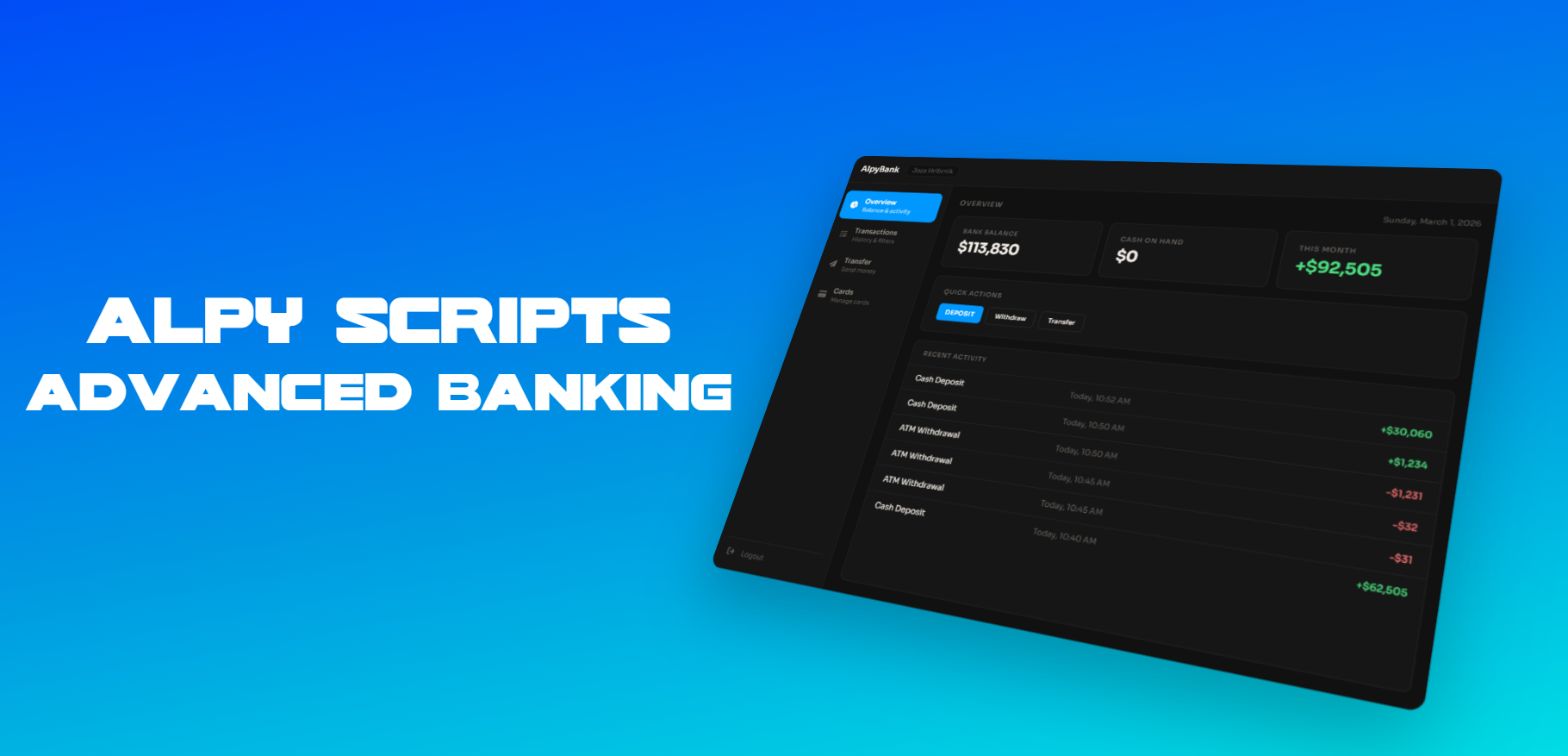
<p>AlpyBanking is a premium banking resource for FiveM servers running ESX or QBCore. It features a sleek, flat dark UI with smooth animations, real-time balance updates, and a full suite of banking features — all validated server-side for maximum security.</p>
<p><strong>Features</strong></p>
<p>Players can deposit and withdraw money, send transfers to other players using short IBAN codes, and view their full transaction history with dates and running balances. Everything persists across server and resource restarts.</p>
<p>The PIN system separates bank branches from ATMs. At a bank, players set their account PIN on first visit and can access everything freely. At an ATM, a PIN is required every time. Both the account PIN and card PIN are stored and verified entirely server-side — the client never sees them.</p>
<p>The card system includes a virtual bank card with a freeze toggle that blocks ATM access and withdrawals, a transaction alerts toggle that sends in-game notifications on every movement, and an optional Order Card button that lets players receive a physical card item directly from the UI. A physical card requirement for ATMs can also be enforced via config.</p>
<p>World integration includes pre-configured bank and ATM locations with map blips, ox_lib TextUI prompts with E-key interaction, ox_target support, optional ATM prop spawning, and an optional opening animation. A command-only mode is also available.</p>
<p><strong>Security</strong></p>
<p>Webhook URLs are stored in a server-only config file and are never sent to clients. Every action has server-side rate limiting and full input validation. The escrow_ignore list ensures configs, locales, and the INSTALL folder remain editable after escrow.</p>
<p><strong>Discord Webhooks</strong></p>
<p>Individual webhook URLs for deposits, withdrawals, transfers, card freezes, PIN changes, IBAN updates, and card orders. Rich embeds include the player name, identifier, IBAN, and timestamp.</p>
<p><strong>Compatibility</strong></p>
<p>Works with ESX and QBCore — auto-detected at startup. Inventory system auto-detection supports ox_inventory, qs-inventory, and tgiann-inventory, with a graceful fallback. An INSTALL folder is included with per-inventory item files and the card image.</p>
<p><strong>Languages</strong></p>
<p>11 languages included out of the box: English, Slovenian, German, French, Spanish, Polish, Turkish, Portuguese (BR), Dutch, Czech, and Hungarian. Switching language takes one line in the config.</p>
<p><strong>Requirements:</strong> ESX or QBCore · ox_lib · oxmysql · MySQL / MariaDB</p>
<p><strong>Installation:</strong> Drop the folder into resources, add ensure AlpyBanking to server.cfg, fill in the two config files, and restart. Database tables are created automatically.</p>
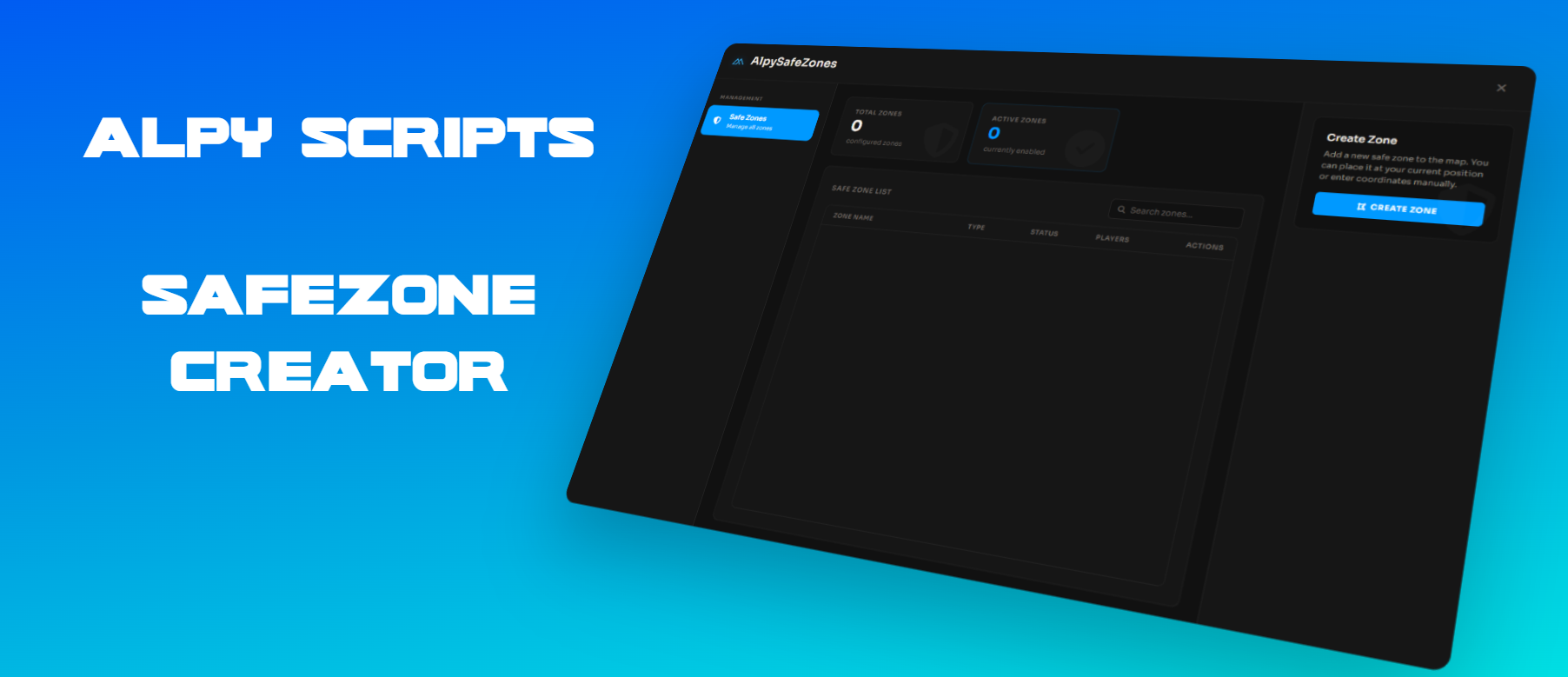
<p>Create and manage custom safe zones from a single admin panel. Draw polygon boundaries directly in-game, configure rules for each zone, and optionally display them on the map with custom blips.</p>
<p>Built for performance and production servers and compatible with ESX, QBCore, ox_core, and standalone setups.</p>
<hr />
<h1>Why Choose AlpySafeZones?</h1>
<p><strong>In-Game Zone Creation</strong><br />
Create zones directly in the world using a free camera. Place points with your mouse, undo mistakes instantly, and confirm the shape once at least three points are placed. Green walls visualize the zone boundaries during creation.</p>
<p><strong>Complete Control Per Zone</strong><br />
Every zone can have its own rules. Disable PvP, vehicle damage, explosions, weapons, or punching. You can also enable a speed limit and define the maximum speed in km/h.</p>
<p><strong>Custom Map Blips</strong><br />
Choose whether a zone appears on the map. When enabled you can configure the sprite, color, scale, and label so players can easily identify safe areas.</p>
<p><strong>Central Admin Panel</strong><br />
Manage all zones from a single NUI interface. Create new zones, edit existing ones, enable or disable them, delete them, and search through the full list instantly.</p>
<p><strong>Framework Friendly</strong><br />
Automatically detects ESX, QBCore, or ox_core. Permissions can be handled through framework groups or Ace permissions. Also works without any framework using Ace only.</p>
<p><strong>Persistent and Automated</strong><br />
Zones are saved automatically using oxmysql. The database table is created automatically on first start so manual SQL setup is not required.</p>
<p><strong>Discord Integration</strong><br />
Optional webhooks allow logging of zone creation, edits, player enter and exit events, and admin access. Custom bot name, avatar, and color are supported.</p>
<p><strong>Multi-Language Support</strong><br />
Includes ten languages: English, German, French, Spanish, Italian, Dutch, Polish, Portuguese, Slovenian, and Turkish. Config and locale files remain editable.</p>
<hr />
<h1>Features Overview</h1>
<p><strong>Polygon Zone System</strong><br />
Create zones with any shape using three or more points. Boundaries are precise and optimized for performance.</p>
<p><strong>Per-Zone Rule System</strong><br />
Each zone can independently control PvP, vehicle damage, explosions, weapons, punching, and speed limits.</p>
<p><strong>Markers and Map Blips</strong><br />
Ground markers can be configured globally. Zones can optionally appear on the map with custom sprite, color, scale, and label.</p>
<p><strong>Admin Management Interface</strong><br />
One menu for everything. View all zones, search instantly, create new ones, edit settings, toggle zones, or remove them.</p>
<p><strong>Notification System</strong><br />
Player enter and exit notifications use ox_lib with built-in fallbacks.</p>
<p><strong>Permission System</strong><br />
Server-side permission handling using ESX groups, QBCore groups, or Ace permissions.</p>
<p><strong>Database Support</strong><br />
Uses oxmysql with automatic table creation on first startup.</p>
<p><strong>Discord Logging</strong><br />
Supports up to three webhooks for zone management logs, player activity logs, and admin access logs.</p>
<p><strong>Localization</strong><br />
Ten languages included. Locale and configuration files are not encrypted.</p>
<hr />
<h1>Requirements</h1>
<p>ox_lib<br />
Required for notifications and shared initialization.</p>
<p>oxmysql<br />
Required for zone persistence and automatic database table creation.</p>
<p>PolyZone<br />
Optional. The resource already includes built-in polygon logic.</p>
<p>Compatible with ESX, QBCore, ox_core, or standalone servers using Ace permissions.</p>
<hr />
<h1>Installation</h1>
<p>Install ox_lib and oxmysql.</p>
<p>Ensure both resources load before AlpySafeZones in your server.cfg.</p>
<p>Configure admin access in <code>server/server.config.lua</code> using AllowedGroups or Ace permissions.</p>
<p>Optionally configure Discord webhooks and global zone behavior in the server configuration.</p>
<p>Open the menu in-game using the <code>/safezones</code> command. The command can be changed in <code>config.lua</code>.</p>
<p>A full setup guide is included in the README file.</p>
<hr />
<h1>Creating a Zone</h1>
<p>Open the admin menu with <code>/safezones</code>.</p>
<p>Select <strong>Create Zone</strong>.</p>
<p>Enter the zone name and configure permissions such as PvP, weapons, markers, notifications, and speed limits.</p>
<p>Under <strong>Map Blip Settings</strong>, choose whether the zone should appear on the map. If enabled, set the sprite, color, scale, and label.</p>
<p>Click <strong>Save & Draw Zone</strong> to start drawing.</p>
<p>Drawing controls<br />
WASD moves the camera<br />
R and F move up or down<br />
Left mouse button places a point<br />
Backspace removes the last point<br />
Enter confirms the zone (minimum three points required)</p>
<p>Once confirmed, the zone is saved and becomes active immediately.</p>

![[ESX & QB] Alpy Robberies](http://dunb17ur4ymx4.cloudfront.net/packages/images/8861955b323c0aaeab9f7060132bc5b263bbb967.png)
![[ESX & QB] Boss Menu](http://dunb17ur4ymx4.cloudfront.net/packages/images/7d7e804e2bbd53d14fc4f8783d5a02584626c5bc.png)
